Tuning Link Up/Down Flap Alarms in HPE IMC
How to investigate HPE IMC "Link UP / Link DOWN had 3 intermittent failures" alarms and adjust the trap filter threshold to reduce false positives.
IMC raises this alarm when a port flaps:
iMC alarm system found event (Link UP) and event (Link DOWN) had 3 intermittent failures from <date/time> to <date/time>Investigate before tuning #
Don’t dismiss link flaps. Find the device and port in the alarm, log into the switch, and check the log (newest first on ArubaOS-Switch):
show logging -rLook for errors like this one, which point to a real physical problem you need to fix:
W 12/12/14 14:25:13 02672 FFI: ST1-CMDR: port 2/5-Excessive link state transitionsReduce false positives #
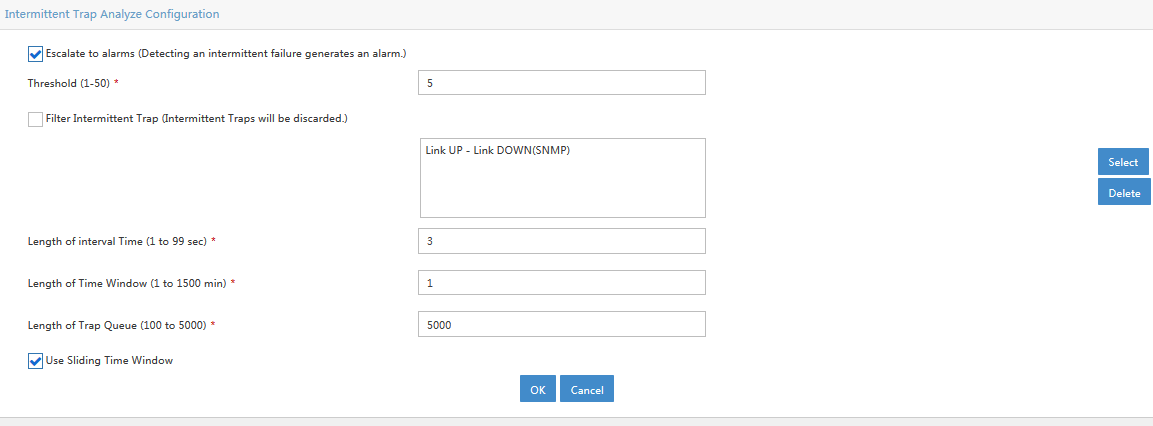
By default, the alarm fires after three flaps in 30 seconds. In my case most of them were false positives, so I made it less sensitive.
In IMC, go to Alarm → Trap Management → Filtering Trap:

Click Modify and increase the number of flaps. I raised it from 3 to 5: