VRF / VPN-Instance Inter-VLAN Routing on HPE Comware v7
How to configure multiple VRF/VPN-Instances on HPE Comware v7 with inter-VRF route leaking via BGP route targets.
How to route between VLANs that sit in different VPN-Instances (VRFs) on an HPE Comware switch.
A customer running VPN-Instances on HPE Comware 5500-HI switches needed the switch to act as the default gateway and route between two VPN-Instances. A VPN-Instance splits the routing table, the same as a VRF on Cisco, so this isn’t enabled by default. You can’t do it with static routing: it needs MP-BGP to leak routes between the instances using route targets.
There are three parts:
- VLAN interfaces bound to a VPN-Instance
- VPN-Instance configuration with a route distinguisher and BGP import/export route targets
- BGP configuration that redistributes the connected routes
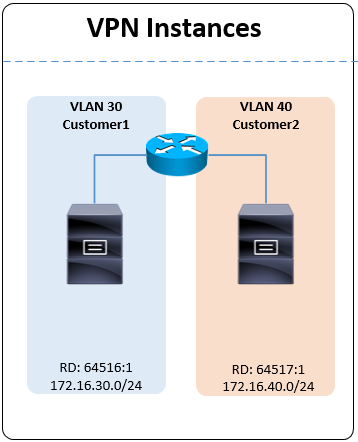
VPN-Instance definitions #
ip vpn-instance Customer1
 route-distinguisher 64516:1
 description Customer1
 vpn-target 64516:1 64517:1 import-extcommunity
 vpn-target 64516:1 export-extcommunity

ip vpn-instance Customer2
 route-distinguisher 64517:1
 description Customer2
 vpn-target 64517:1 64516:1 import-extcommunity
 vpn-target 64517:1 export-extcommunity
VLAN interface bindings #
interface Vlan-interface30
 description Customer1
 ip binding vpn-instance Customer1
 ip address 172.16.30.3 255.255.255.0

interface Vlan-interface40
 description Customer2
 ip binding vpn-instance Customer2
 ip address 172.16.40.3 255.255.255.0
BGP route redistribution #
bgp 65001

 ip vpn-instance Customer1
  address-family ipv4 unicast
   import-route direct

 ip vpn-instance Customer2
  address-family ipv4 unicast
   import-route direct
Verification #
display ip routing-table vpn-instance Customer1
display ip routing-table vpn-instance Customer2
BGP entries for the other VPN-Instance’s prefix confirm the routes are being leaked. Hosts in VLAN 30 and VLAN 40 can now ping each other as though the switch were a normal inter-VLAN router.