Policy Based Routing (PBR) on HPE Comware v7
How to configure Policy Based Routing on HPE Comware v7 to route traffic to different next-hops using ACL matching, applicable to VLAN interfaces and physical ports.
How to configure Policy Based Routing (PBR) on HPE Comware v7. Traffic is matched by ACLs and redirected to an alternative next-hop, overriding the routing table.
Scenario #
The setup is identical to the ArubaOS-Switch PBR guide. The switch (.254) has a default gateway of 2.2.2.1.
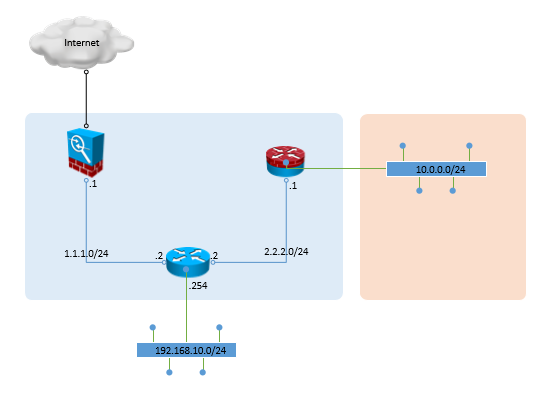
From 192.168.10.0/24: internal traffic (to 10.0.0.0/8 or 192.168.0.0/16) uses the normal routing table, internet traffic is sent to 1.1.1.1.
Step 1 — Create the ACLs #
acl number 3001 name CUSTOMER01-PBR-INTERNAL-TRAFFIC
 rule permit ip source 192.168.10.0 0.0.0.255 destination 10.0.0.0 0.255.255.255
 rule permit ip source 192.168.10.0 0.0.0.255 destination 192.168.0.0 0.0.255.255

acl number 3002 name CUSTOMER01-PBR-EXTERNAL-TRAFFIC
 rule permit ip destination 0.0.0.0 255.255.255.255
Note: ACL 3002 also matches 172.16.0.0/12 — add that range to ACL 3001 if used internally.
Step 2 — Create the PBR policy #
Node 10 (deny) bypasses PBR for internal traffic. Node 11 (permit) redirects everything else:
policy-based-route CUSTOMER01-PBR deny node 10
 if-match acl 3001
 quit

policy-based-route CUSTOMER01-PBR permit node 11
 if-match acl 3002
 apply next-hop 1.1.1.1
 quit
Step 3 — Apply to an interface #
VLAN interface:
interface vlan 10
 ip policy-based-route CUSTOMER01-PBR
Or a physical port:
interface Gi1/0/10
 ip policy-based-route CUSTOMER01-PBR