Policy Based Routing Within a VRF/VPN-Instance on HPE Comware v7
How to configure PBR inside a VRF (VPN-Instance) on HPE Comware v7, routing internal traffic normally and redirecting internet traffic to a specific next-hop within the VRF.
How to configure PBR within a VRF/VPN-Instance on HPE Comware v7. Useful in multi-tenant environments where traffic must be steered within an isolated routing domain.
PBR within a VRF is only supported on Comware v7 — not Comware v5.
Only a few changes are needed compared with PBR outside a VRF: the VPN-Instance has to be referenced in the next-hop and in the ACL rules. A VPN-Instance is Comware’s name for a VRF.
Scenario #
Same addressing as the other PBR guides: the switch (.254) has a default gateway of 2.2.2.1.
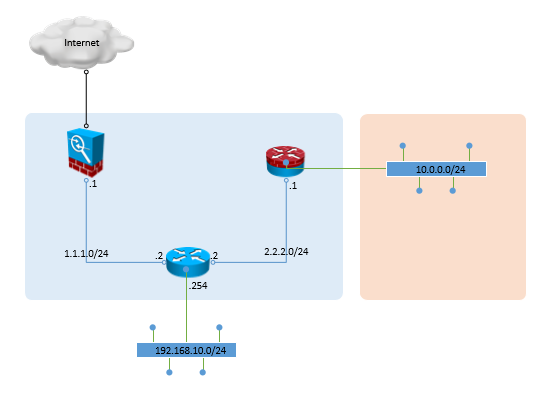
Inside VPN-Instance Customer01: internal traffic follows the default route, internet traffic goes to 1.1.1.1.
Step 1 — Create the VPN-Instance #
ip vpn-instance Customer01
 route-distinguisher 65005:1
 description Customer01
Step 2 — Create the PBR policy nodes #
policy-based-route CUSTOMER01-PBR deny node 10
 if-match acl 3001
 quit

policy-based-route CUSTOMER01-PBR permit node 11
 if-match acl 3002
 apply next-hop vpn-instance Customer01 1.1.1.1
 quit
Step 3 — Create the ACLs #
acl number 3001 name CUSTOMER01-PBR-INTERNAL-TRAFFIC
 rule permit ip source 192.168.10.0 0.0.0.255 destination 10.0.0.0 0.255.255.255 vpn-instance Customer01
 rule permit ip source 192.168.10.0 0.0.0.255 destination 192.168.0.0 0.0.255.255 vpn-instance Customer01

acl number 3002 name CUSTOMER01-PBR-EXTERNAL-TRAFFIC
 rule permit ip destination 0.0.0.0 255.255.255.255 vpn-instance Customer01
Step 4 — Apply to the VLAN interface #
interface vlan 10
 ip binding vpn-instance Customer01
 ip policy-based-route CUSTOMER01-PBR
 ip address 192.168.10.254 255.255.255.0
 description Customer01