SNMPv3 Configuration on HPE Aruba ArubaOS-Switch with HPE IMC
How to configure SNMPv3 on HPE Aruba ArubaOS-Switch for use with HPE IMC, using SHA authentication and AES-128 encryption.
How to configure SNMPv3 on HPE Aruba ArubaOS-Switch for HPE IMC. The built-in wizard initialises SNMPv3, then you replace the wizard user with a stronger SHA/AES-128 account.
Step 1 — Run the SNMPv3 wizard #
Use throwaway passwords — you will delete this user:
Switch(config)# snmpv3 enableAt the prompts: accept defaults, answer n to creating a SHA user, answer y to restricting SNMPv1/v2c to read-only.
Step 2 — Create a secure SNMPv3 user #
snmpv3 user swsnmpv3user auth sha authenticationpassword priv aes encryptionpassword
snmpv3 group managerpriv user swsnmpv3user sec-model ver3
Step 3 — Delete the wizard user #
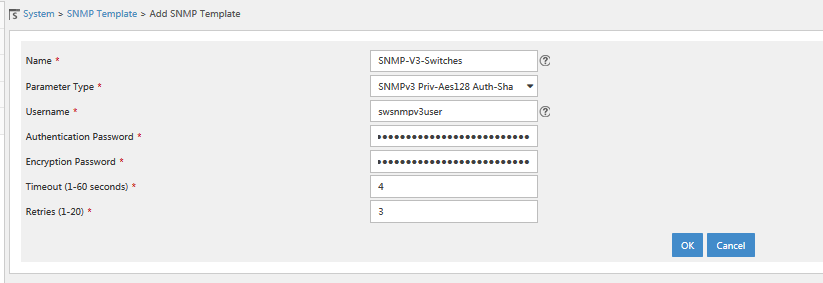
no snmpv3 user initialStep 4 — Configure IMC #
In IMC, go to System → SNMP Template → Add SNMP Template and enter the username, SHA authentication password and AES-128 privacy password you created above. You can then discover the switch using this template.